
Agents
An agent is a configured assistant: a model, a prompt, a set of permissions, and an environment to work in. You can have as many as you like — a general assistant, a code reviewer that can only read, a researcher with web access.
Creating an agent
Select New agent in the agent list. You need at least one model entry first. The new agent gets its own environment and a working folder in it.
To add an agent that works on the same files as an existing one, open that agent's Agent Settings → Environment and choose New agent in this environment.
Agent settings
Open an agent's settings from its menu. Owners see every section; people using a shared agent only see Integrations and Archived, which are personal to them.
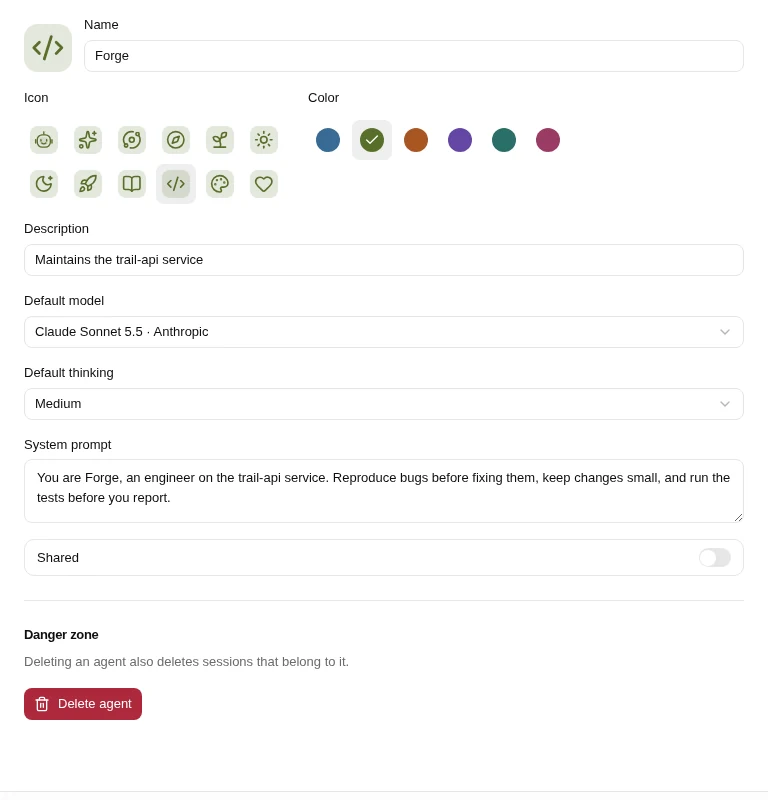
| Section | What you configure |
|---|---|
| General | Name, description, icon and color, default model, default thinking level, system prompt, working folder, and sharing. |
| Environment | Which environment the agent runs in, its mounts, sandbox network access, and secrets. See Workspace. |
| Knowledge | Searchable Markdown sources. See Knowledge. |
| Templates | Prompt templates shown in the command palette. See Skills and templates. |
| Collaboration | Which other agents this agent may consult or delegate to. See Agent collaboration. |
| Permissions | Read files, Write files, Edit files, Run commands, and Web access. |
| Codemode | Let the agent script its tools in a sandboxed JavaScript worker. See Codemode. |
| MCP | Remote and sandboxed MCP servers and their tool allowlists. See MCP servers. |
| Integrations | Your personal Telegram, Feishu, or Lark connection. See Messaging apps. |
| Archived | Your archived sessions with this agent. |
Changes to model, prompt, permissions, and tools apply to the next run.
System prompt and project instructions
The System prompt is the agent's standing instructions. Carmel Agent adds its own instructions for tools, Home, collaboration, and links around it.
The agent also picks up files from its working folder, so project instructions can live with the project and be versioned with it:
AGENTS.md(orCLAUDE.md) is loaded as project context.- Skills in
.agents/skillsand prompt templates in.pi/promptsappear as slash commands. - Variables in
.envare exported to the agent's commands. Environment secrets take precedence over values with the same name.
Permissions
Permissions decide which tools exist during a run. A tool the agent doesn't have permission for is never offered to the model.
- Read files — read, search, find, and list in the working folder, the environment's
/tmpand/home/agent, and its mounts. Downloads in the file manager. - Write files — create and replace files. Create, upload, move, copy, and delete in the file manager.
- Edit files — patch-style edits. Edit and rename in the file manager.
- Run commands — bash in the environment's sandbox, the web terminal, the shared browser, and stdio MCP servers. Requires the runner image and a reachable container socket.
- Web access —
fetch_url,exa_search(when the server has an Exa key), remote MCP servers, the built-in browser skill (together with Run commands), and model downloads for Knowledge and memory.
New agents start with the three file permissions enabled. Run commands and Web access are off until you turn them on.
TIP
Web access governs what the agent itself may do on the web. Whether commands inside the sandbox can reach the network is a separate setting, Sandbox network access, on the environment.
Sharing an agent
Turn on Shared in General to let everyone on the instance use the agent. They chat in their own private sessions and have their own Home, memory, integrations, and tasks. They cannot see or change the agent's settings, MCP configuration, or secrets.
What they do get is the agent's capabilities — including its environment's files, secrets, browser sign-ins, and MCP credentials. A person using your shared agent can ask it to use, or print, a secret its environment holds. Only share an agent whose environment you are comfortable handing over.
Only the owner can open the web terminal. Other users of a shared agent can use its shared browser.
Deleting an agent
Delete agent is in the General danger zone. Deleting an agent also deletes the sessions that belong to it. If it was the last agent in its environment, the environment and its secrets are deleted too; workspace and home files stay on disk.
Carmel Agent refuses to delete an agent, model entry, provider, or user account that a run in progress depends on.