
Tasks
Tasks are for work you want to hand off and review rather than watch: an investigation, an implementation, a report. A task keeps the brief, the discussion, every run, and the review result together.
Open Tasks in the agent navigation, next to Schedules.
Create and queue a task
Select New task and write a title and brief. You can add details, acceptance criteria (one per line), and a priority.
- Save to backlog keeps the task for later.
- Queue work adds it to the agent's queue. It starts as soon as the agent is free.
An agent runs one task at a time, including across everyone using a shared agent. Reorder your queued tasks with the up and down controls, or use Remove from queue to move one back to the backlog. Priority is descriptive; queue order decides what runs next.
You can also ask the agent in Home to create, queue, revise, or stop tasks for you.
Task views
| View | What it shows |
|---|---|
| Queue | Running and queued tasks, in order. |
| Needs you | Questions, reported obstacles, execution failures, and work waiting for your review. |
| Backlog | Saved tasks that are not queued. |
| Done | Accepted and closed tasks. |
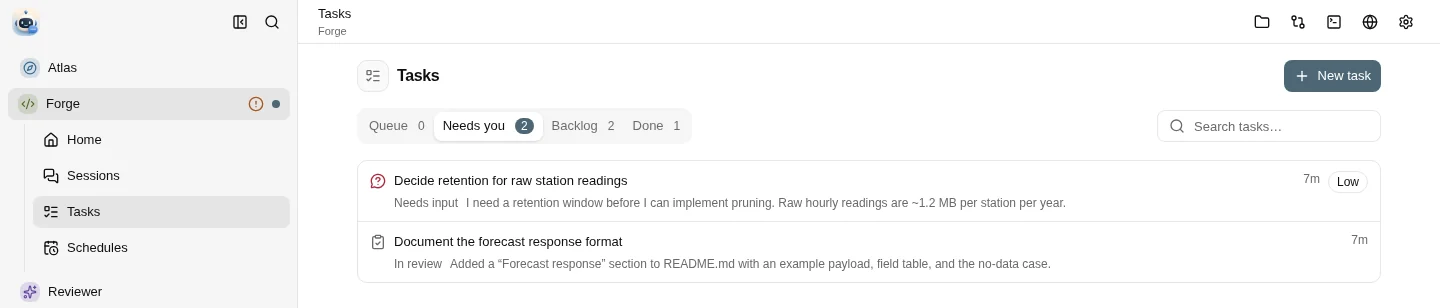
Sharing an agent does not share tasks. Your tasks, notes, and conversations stay private.
While a task runs
A task has one continuous conversation by default. Replies, retries, and requests for changes all continue it.
- Send update steers a running task. The conversation shows whether the update is queued, delivered, or saved without delivery. An update that arrives after the run ends is kept as a note rather than applied silently later.
- Save note adds context without starting work. Notes are included the next time the task runs.
- Stop run ends the current run. Queue a retry to continue the conversation.
- Use a fresh conversation next run starts the next run in a new conversation. Earlier conversations and results stay in the run history.
Reviewing results
When the agent finishes, it reports with a summary and concrete verification evidence:
- Done moves the task to In review.
- Needs input asks you a question.
- Blocked describes an obstacle.
Any of these frees the agent to start its next queued task. A run that ends without a report asks for your input instead of entering review. Execution failures keep their error and offer a retry.
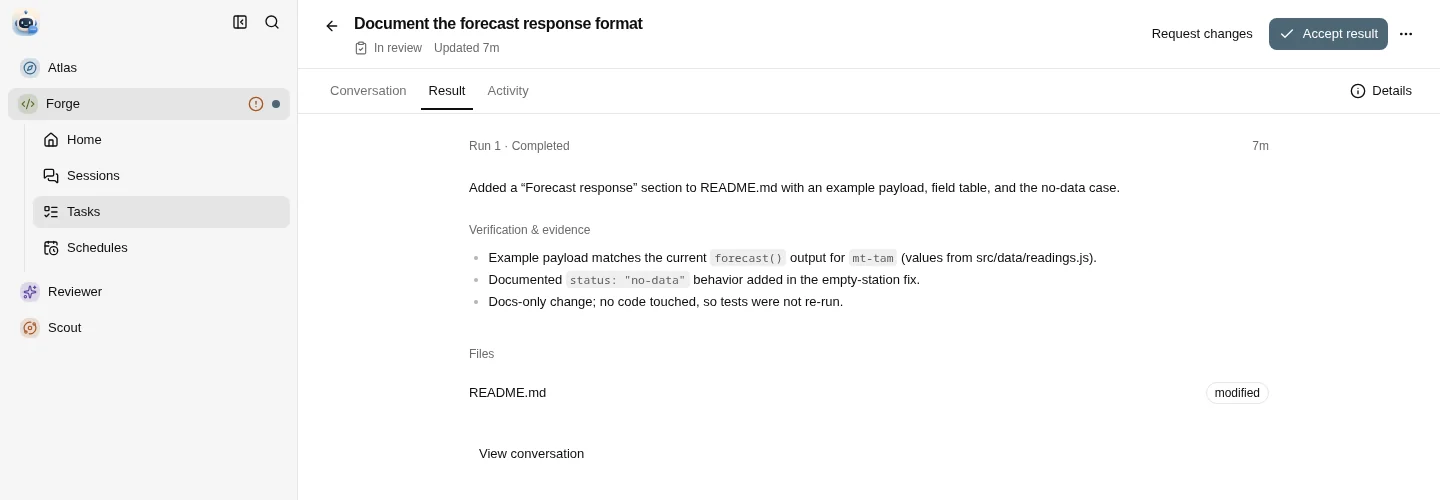
Only Accept result marks a task done. Request changes sends your feedback and queues another run in the same conversation. Closed tasks can be reopened without running them automatically.
Changed files
Each run saves before-and-after versions of the text files it changed in the agent's workspace, so the review panel shows exactly what that run did even after later runs make more changes.
Captures skip symlinks, common credential and cache paths, and binary or very large files, and they redact the environment's secrets. Partial captures are labeled. Limits are 2,000 entries, 256 KiB per file, and 2 MiB per workspace read.
Subtasks
A task can split off read-only research with subtasks. Subtasks can read the workspace, search Knowledge and your past conversations, and — with Web access — search and fetch the web. They cannot edit files, run commands, drive the browser, send messages, create tasks, or delegate further.
Subtasks can run in the background in parallel; the task collects every result before reporting. Each conversation can have four active subtasks, each with a five-minute deadline. Inspect them inline on the task page. Stopping a task also stops its subtasks, and Home only receives the task's final result.
Notifications
Results and requests for attention come back to your private Home with a link to the task and its evidence. To be notified in a messaging app, set a notification destination on the task. See Messaging apps.
Delegating to another agent
With a permitted collaboration connection, an agent can create a task for another agent. The work runs in the receiving agent's queue and environment, and each side keeps its own acceptance step.
Restarts
The queue survives server restarts. A run interrupted by a restart is marked interrupted and needs an explicit retry; the rest of the queue continues automatically.