
Skills and templates
Skills and prompt templates let you package instructions you use often. Both appear in the command palette — press / in an empty composer or Ctrl/⌘ + K.
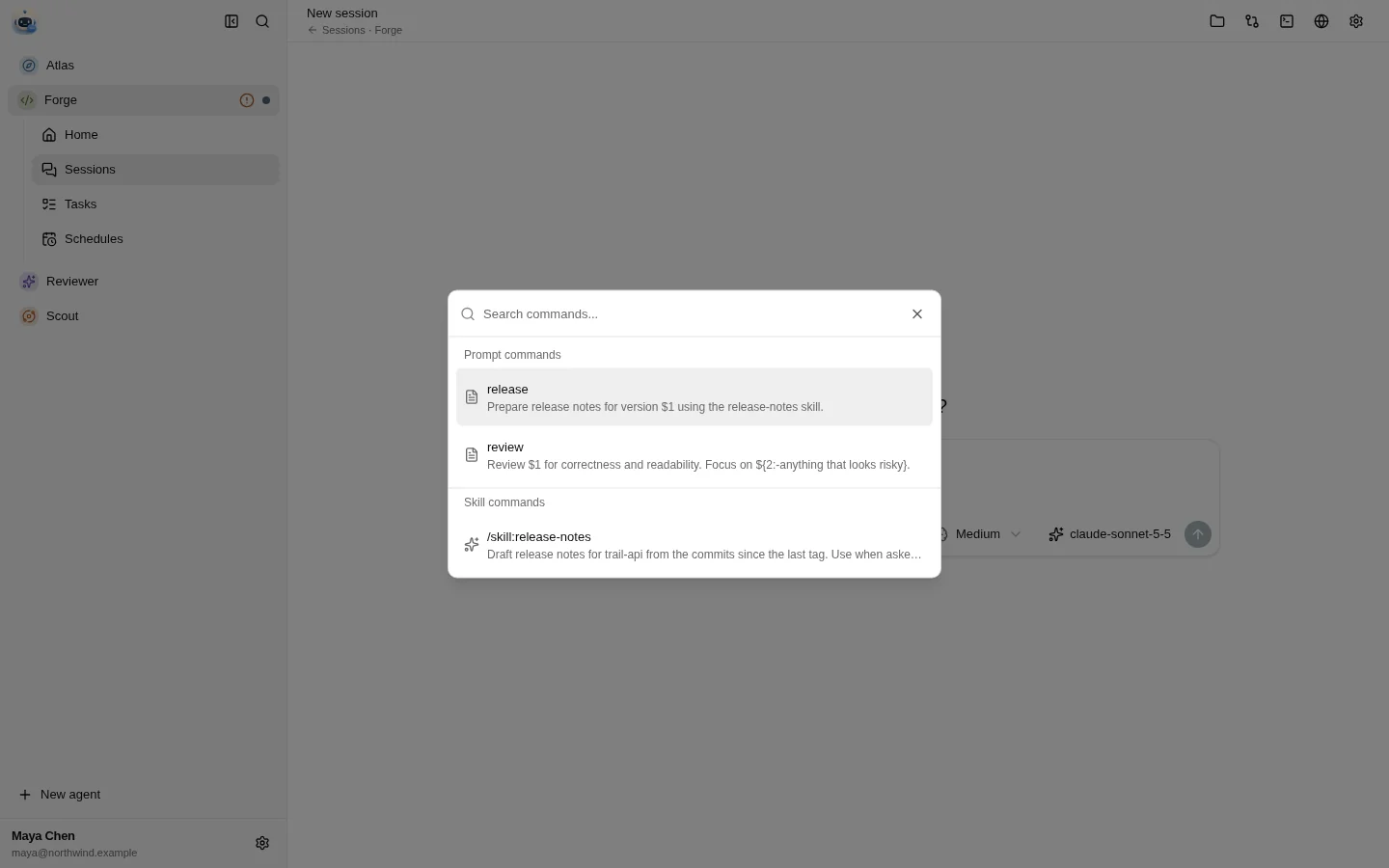
Skills
A skill is a folder with a SKILL.md file that teaches the agent how to do something: a release checklist, a house style, how to use an internal CLI. The agent sees each skill's name and description and loads the full instructions when they are relevant. You can also invoke one directly as /skill:<name>.
Skills are loaded from the agent's working folder only:
<working folder>/.agents/skills/<skill-name>/SKILL.mdA minimal skill looks like this:
---
name: release-notes
description: Draft release notes from merged pull requests. Use when asked to prepare a release.
---

# Release notes

1. List pull requests merged since the last tag with `gh pr list --state merged`.
2. Group them into Features, Fixes, and Maintenance.
3. Write one line per change, in the past tense, linking the pull request.
Global skill discovery is disabled, so skills from elsewhere on the host are never picked up. Agents with read permission can inspect their own skills, and agents with write permission can create new ones.
Built-in skills
Carmel Agent ships two skills that appear automatically when they apply:
| Skill | Available when | Teaches |
|---|---|---|
agent-browser | The agent has both Run commands and Web access. | Driving the shared browser, when to ask you for help, and verifying after you hand it back. |
knowledge-search | Knowledge is enabled and the agent can read files. | Choosing search modes, verifying passages, and citing sources. |
A built-in skill takes precedence over a workspace skill with the same name.
Prompt templates
A prompt template is a reusable message. Selecting it from the command palette inserts it as /<name>, and anything you type after the name is passed as arguments.
Add templates in Agent Settings → Templates with a Template name and Template text. Templates can also live in the working folder as Markdown files, so they can be versioned with a project:
<working folder>/.pi/prompts/<name>.mdTemplate text can use arguments:
| Placeholder | Replaced with |
|---|---|
$1, $2, … | A single argument. |
$@ or $ARGUMENTS | All arguments, separated by spaces. |
${1:-default} | An argument, or default when it is missing. |
${@:2}, ${@:2:3} | Arguments from position 2 onward, or three of them. |
Wrap an argument in quotes to include spaces: /review "src/app server.ts" strict.
For example, a template named review with the text
Review $1 for correctness and readability. Focus on ${2:-anything that looks risky}.turns /review src/auth.ts "error handling" into a complete request.