
Providers and models
Carmel Agent uses your own model provider accounts. Administrators connect providers once for the whole instance; everyone then picks models from them.
Providers
Open Settings → Providers (administrators only) to add a provider. Each provider config has a type, a label, an optional API base URL, and an authentication method:
- API key — for Anthropic, OpenAI, and the other providers supported by Pi, as well as OpenAI-compatible endpoints.
- OAuth login — for providers whose Pi integration supports signing in with an account.
- A base URL — for an Ollama server.
There is one shared set of providers for the instance, and any administrator can create, edit, or delete them. Stored API keys and OAuth credentials are encrypted with CARMEL_SECRET_KEY and never returned to a browser; the interface only shows whether a credential is present.
Ollama
Ollama uses its OpenAI-compatible API. The base URL defaults to:
http://localhost:11434/v1When Carmel Agent runs in a container, localhost is the container itself — use an address the server container can reach, such as the host's LAN address. Once configured, Carmel Agent can list the models available at that URL.
Model catalogs
Model lists for configured providers are refreshed when the server starts and cached in the database, so they stay current without a manual step. Use Refresh models to update them on demand. Refresh failures are logged and never block startup.
Models
A model entry is what people choose for agents and sessions. Anyone can add model entries in Settings → Models from the instance's providers.
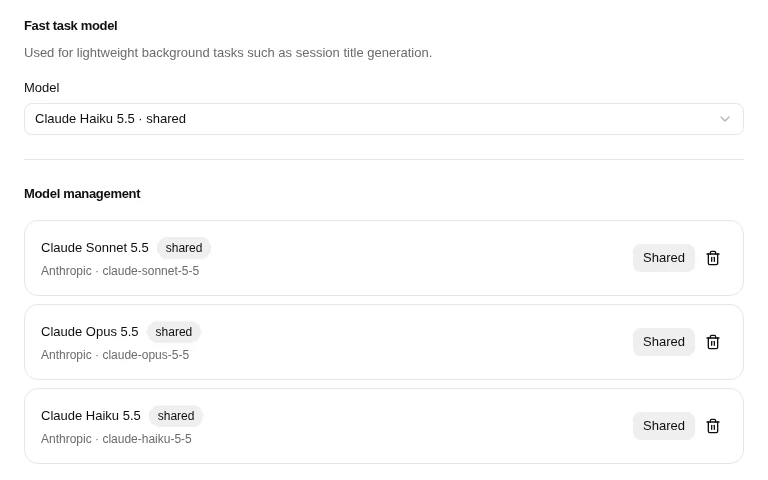
A model entry belongs to whoever created it. Mark it Shared so everyone on the instance can select it. The credentials behind it stay on the server either way.
People can use model entries they created, model entries marked shared, and model entries with no provider config behind them.
Deleting a model entry or provider that agents or sessions depend on requires another usable fallback model for the affected people, and is refused while a run using it is in progress.
Fast task model
Each person can choose a Fast task model in Settings → Models. It is used for light background work such as generating session titles. Without one, the session's own model is used.
API access
Everyone can create API keys under Settings → API Keys to use their models from any OpenAI-compatible client. See OpenAI-compatible API.
Web search
fetch_url works without any key. To enable the exa_search tool for agents with Web access, set EXA_API_KEY on the server.